
Integration Overview
Use this integration to capture Claude Code cloud-agent activity and upload each session log to your own Google Cloud Storage bucket. It is meant for testing cloud-agent telemetry without running a hosted Asymptote backend. This flow depends on the Beacon CLI. You runbeacon cloud commands from your
workstation to create the GCS upload path, print Claude environment variables,
and generate the setup script that runs inside the Claude cloud sandbox.
If you’re interested in leveraging this telemetry ingest across your
enterprise, Asymptote Managed is designed for
production cloud-agent telemetry ingest at scale.
Overview
Claude Code Cloud Agents run in Anthropic’s cloud environment, so Beacon cannot use the long-running endpoint agent that local installs use. Instead, the setup script installs Beacon hooks inside the sandbox. During a cloud-agent session, those hooks write/tmp/beacon/runtime.jsonl; at the end of the session, Beacon
uploads that file to GCS.
The setup has three parts:
- Create a dedicated GCS bucket and uploader service account with Beacon.
- Add Beacon cloud telemetry environment variables to the Claude Code cloud environment.
- Paste a Beacon-generated setup script into the Claude cloud environment.
Prerequisites
- Beacon CLI
v0.0.51or later. gcloudinstalled and authenticated to the Google Cloud project you will use for telemetry storage.- A Google Cloud project where you can create buckets, service accounts, IAM bindings, and service account keys.
- Claude Code cloud agent access for the repository you want to test.
- A Claude cloud environment with outbound access to:
oauth2.googleapis.comstorage.googleapis.comgithub.com*.githubusercontent.com
gcloud and select your project:
1. Create the GCS Upload Path
From your workstation, choose a bucket and prefix: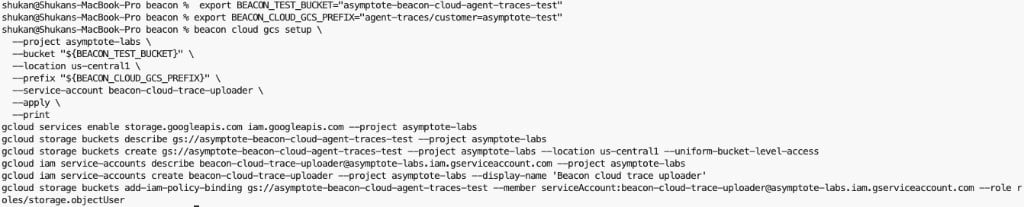
Review the bucket, service account, and IAM commands before applying them.
BEACON_CLOUD_GCS_CREDENTIALS_B64 anywhere you
share screenshots or logs.
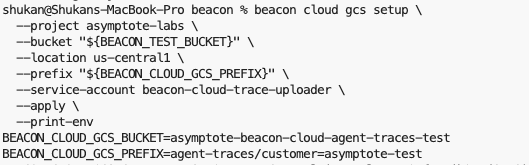
Copy the printed BEACON_CLOUD_GCS_* variables into the Claude cloud environment.
2. Configure Claude Code Cloud Agents
Open the Claude Code web application and select the cloud environment for your repository.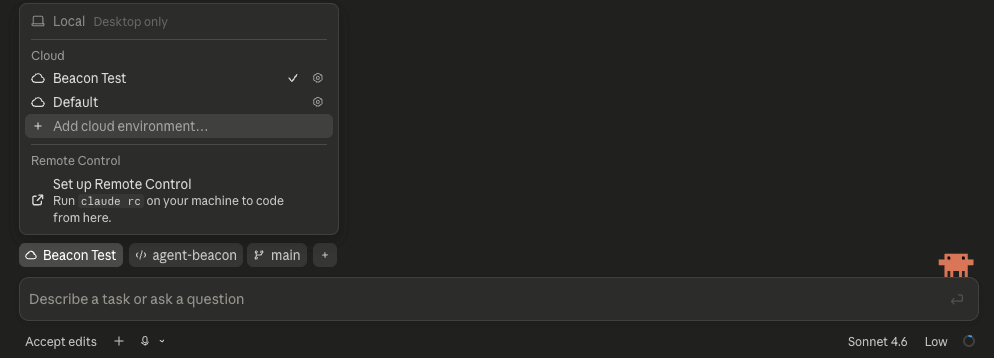
Select or create the Claude cloud environment that should run Beacon telemetry hooks.
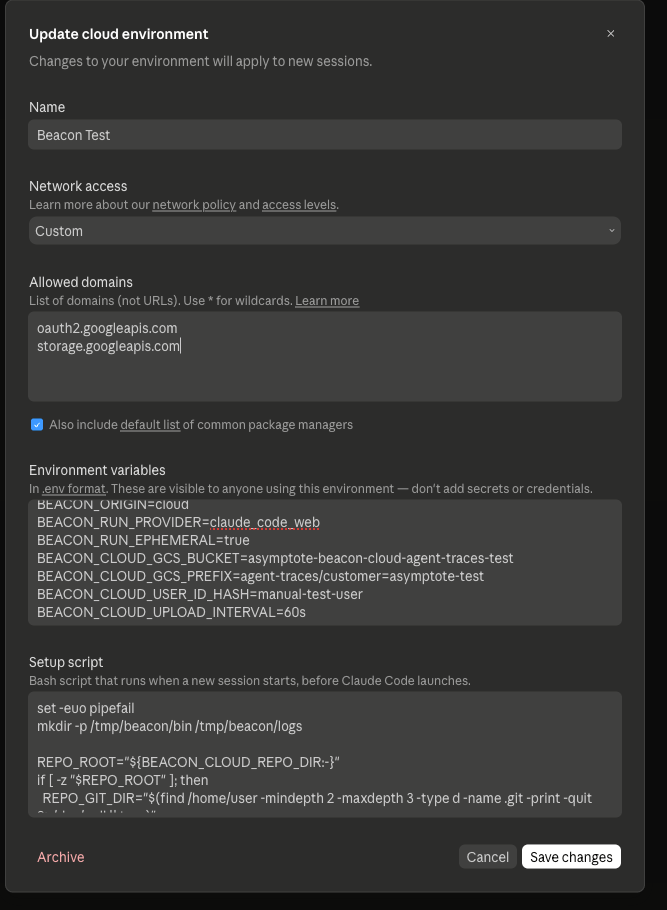
Configure network access, Beacon metadata, GCS bucket settings, and the setup script in the Claude cloud environment.
3. Add the Setup Script
Generate the setup script for your Beacon release:- installs
beaconandbeacon-hooksin/tmp/beacon/bin, - finds the cloud sandbox repository root,
- writes
.claude/settings.local.jsoninside the sandbox clone, - excludes generated Claude settings from git commits.
4. Run a Cloud Agent Task
Start a Claude Code cloud agent task that uses tools. You can start the task from the Claude app on your phone or from the Claude Code web application. For example: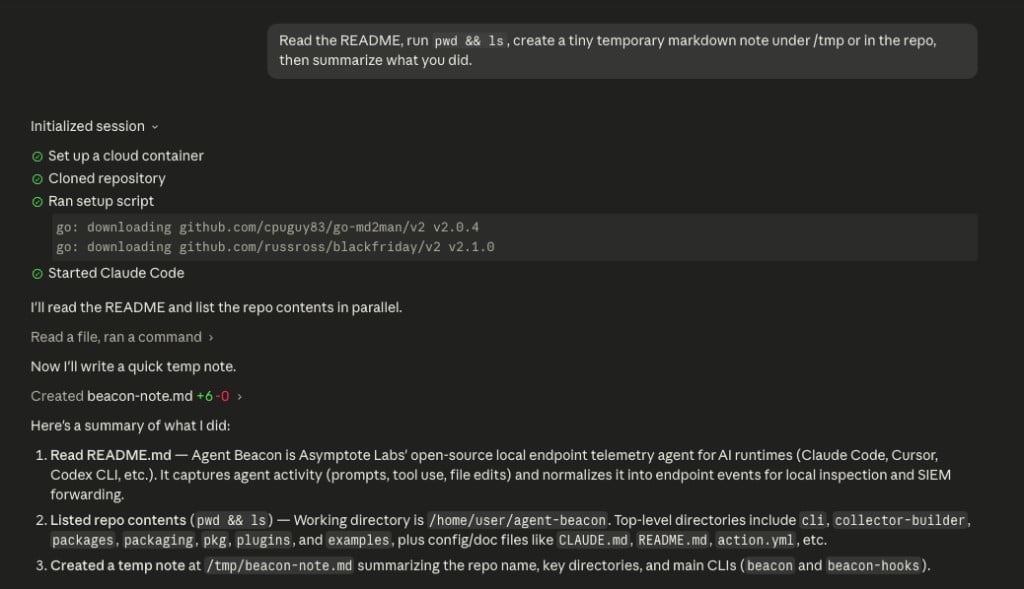
A successful Claude Code cloud agent session runs the setup script, starts Claude Code, and produces normal agent activity.
5. Verify GCS Upload
List the uploaded session objects: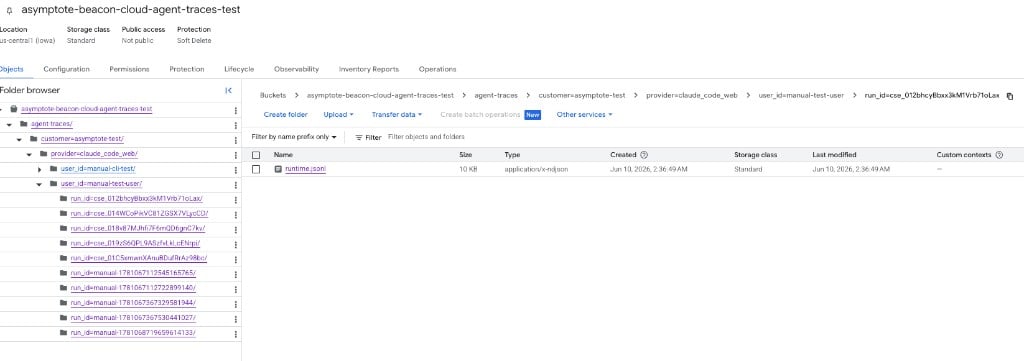
Beacon uploads one readable runtime.jsonl object per Claude Code cloud agent session.
Security Note
The self-serve GCS flow above creates a dedicated service account scoped to object uploads for one bucket, then stores its credentials in the Claude Code environment. This is useful for proof-of-concept testing, but treat that environment variable as a sensitive credential. Claude notes that cloud environment variables are visible to users of that environment and recommends avoiding secrets there when possible. Avoid broad credentials and review access before using this flow with sensitive telemetry.Troubleshooting
The bucket is empty
Confirm the Claude setup script ran and generated hooks:runtime.jsonl exists but GCS is empty, check network access and GCS
credentials. The cloud sandbox must reach both oauth2.googleapis.com and
storage.googleapis.com.
Claude tries to commit hook settings
The setup script should write.claude/settings.local.json, not
.claude/settings.json. settings.local.json is intended for local or
sandbox-specific configuration and should stay out of commits.
Related
Claude Code runtime support
Review local Claude Code telemetry through OTLP and hooks.
Google Cloud Storage forwarding
Review local endpoint GCS forwarding for persistent endpoint deployments.
Asymptote Managed
Use managed secure ingest for production enterprise cloud-agent telemetry.
Agent Beacon on GitHub
Request new cloud-agent destinations or contribute support.